Configuring Customer Statements
Customer Statements are one of the most important emails that can help you get paid on time. With the ATE preference record, you can automate the accurate, reliable sending of statement emails.
Statement Preferences Overview
The Statement preference is represented by the transaction type Statement Charge and has the following additional preferences:

Setting | Definition | |
|---|---|---|
Statement Include Zero Balances | When selecting the customers to email statements to, if this is ticked, it will include customers with both overdue and zero balances. | |
Show only open | When ticked, only open invoices will be included. Otherwise, open, paid, and applied transactions will be included. | |
Statement Days Ago | If left blank, it will include all transactions. If populated with a number of days (e.g., 30), it will only include transactions after that date. Usually this is left blank | |
Consolidate Statements | This will send a Consolidated Statement for the customer. It required the Consolidated Statements feature to be enabled in the Accounting tab. | |
Statement Form | Optionally set a default Transaction for the statement; otherwise, the system default will be used. | |
Statement in Customer Locale | Will email the statement based on your NetSUite langauge settings | |
Attach Open Invoices | In addition to sending out the Statement document, it will also include all open invoices for the customer's reference. |
Set-up
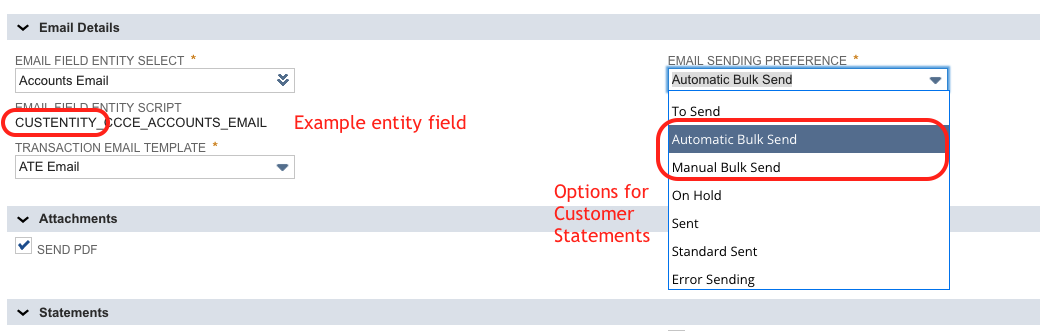
The two recommended Email Sending Preferences for the statements are:
Automatic Bulk Send
Manual Bulk Send
Ensure that you configure the appropriate script deployment to run as you require for the Automatic Bulk Send.
The email field to use, if using a custom email field, must be of an Entity type. After you have selected an email field, check the script id in the Email Field Entity Script field to ensure it starts with custentity.
Setting up Customers
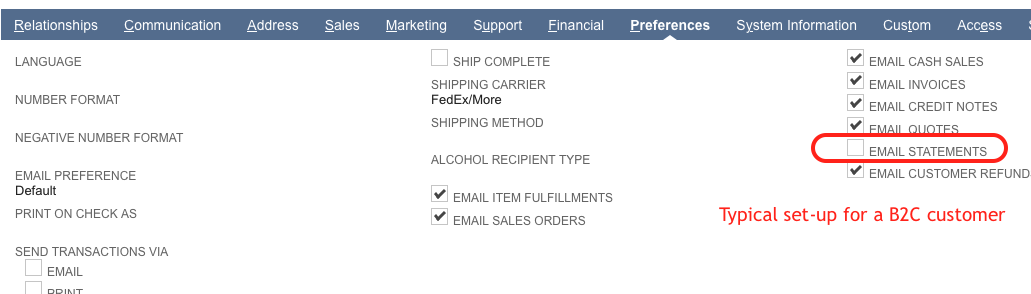
There is an Email Statements preference on the customer record. This needs to be ticked to enable statements to be sent for a specific customer.
Some customers have it that B2C customers do not have statements automatically emailed, but their B2B customers do.